What Is CGNAT? A Clear Guide to Shared IPs

What is CGNAT? It is an extra IPv4 address-sharing layer that your internet provider runs. Several customers share one public IPv4 address. Browsing usually works fine, but incoming connections, such as reaching a home server, may not reach your router. To check your own line, compare your router’s WAN address with the public IPv4 Loqmi sees, then use the port checker to test a TCP port on that public IP.
What is CGNAT and how it works
Your phone, laptop, and TV usually have private addresses on your home network. Your router translates their outgoing connections to its internet-facing, or WAN, address using Network Address Translation (NAT). With CGNAT, your provider translates that traffic a second time, so several customers share one outward-facing IPv4 address. The IETF’s definition of carrier-grade NAT, in RFC 6888, describes a provider-side function that shares one IPv4 address among subscribers who do not manage it.
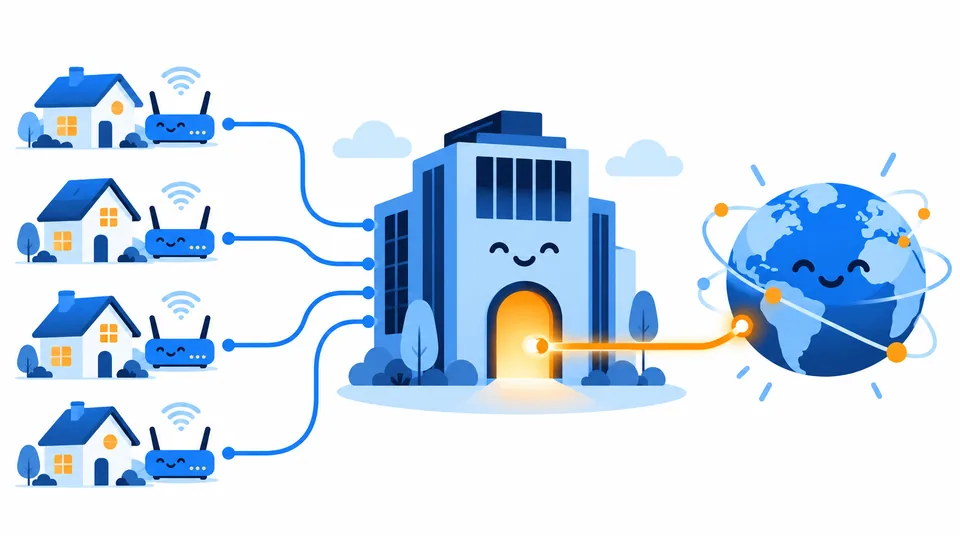
Think of your router as a receptionist for your devices. The ISP’s CGNAT is a second receptionist, and this one covers several buildings. Replies to calls you started get passed back through both desks. A stranger ringing the shared public number has no customer-controlled directory entry that leads to your home.
Providers do this to stretch a limited supply of IPv4 addresses. IPv4 is the older internet addressing system. IPv6 is its newer counterpart, with a much larger address space. An ISP may give you IPv6 alongside shared IPv4, or use a transition design such as Dual-Stack Lite (DS-Lite), which carries IPv4 traffic through an IPv6 access network. The label on your plan won’t tell you which design your line uses.
What changes for you
CGNAT mainly affects traffic that starts outside and heads toward your connection. Browsing, streaming, messaging, and most downloads start on your device, so the network can create temporary translation records for the replies. A home web server, camera, or game server waits for an outside device to start the conversation. Your router’s port-forwarding rule cannot configure the provider’s separate NAT, much like a tenant trying to change the lock on a building they don’t own.
| What you are doing | Typical effect | What to check |
|---|---|---|
| Browsing or streaming | Usually works normally | CGNAT alone is not a speed diagnosis. |
| Hosting a service at home | Direct incoming IPv4 may fail | Compare addresses, then ask about public IPv4, IPv6, or supported port mapping. |
| Joining games or video calls | Often works; some peer connections may be limited | Apps may use relays or NAT traversal, so a strict NAT label is not proof of CGNAT. |
| Sharing an address with other customers | Some sites may show an unexpected location or reputation | A public IP is not a unique identifier for one person or household. |
A shared address can make an IP-based block or allowlist less precise. Location may point to a carrier hub rather than your town. See why your IP location can be wrong.
How to check for CGNAT
Compare the two IPv4 addresses on the same connection, taken at about the same time. Turn off any VPN or proxy first. Otherwise the public address belongs to that service, and you end up comparing the wrong route (an easy way to solve a mystery by adding another mystery).
- Open Loqmi’s IP tool and write down the public IPv4 address. This is the address a website sees for that connection. If the page shows only IPv6, use the IPv4 result for this comparison.
- Sign in to the router, or modem-router, that connects to your provider. Find its Internet, WAN, Status, or Connection page and record the WAN IPv4 address. DHCP (Dynamic Host Configuration Protocol) is one way a network hands out settings automatically, but the address to compare is still the WAN value shown. Menu names differ by maker. Skip your laptop’s or phone’s Wi-Fi address, since that is a local LAN address.
- Compare the values. A router WAN address in
100.64.0.0/10(from100.64.0.0through100.127.255.255) is a strong sign of provider shared addressing. The IETF set this block aside in RFC 6598, and IANA lists it as not globally reachable in its IPv4 special-purpose registry.
If the WAN address is in 10.0.0.0/8, 172.16.0.0/12, or 192.168.0.0/16, it sits in private space defined by RFC 1918. An upstream network still exists, but it could be your ISP or a second home router. If you have an ISP gateway plus your own router, compare from the gateway facing the ISP. That setup is common double NAT.
A failed port test is weaker evidence. The service may be stopped, a rule may use the wrong address or protocol, a firewall may block it, or the ISP may filter the port. Confirm the address path first.
What about mobile data and my mobile IP?
Mobile providers commonly share IPv4 addresses. To see the public address your mobile data uses, switch off Wi-Fi and open Loqmi’s IP tool. Switch Wi-Fi back on to compare networks. The mobile IP you see belongs to the carrier’s path and may be shared, so it is not reserved for your phone. It works a bit like the shared Wi-Fi password at a hotel: plenty of guests use it, and it doesn’t belong to your room.
Phone settings may show a local or carrier-side address instead of the public value websites see. The same goes for home internet: compare the router WAN address with the public address, not with a device’s local one. Learn what someone can find from an IP address.
Is CGNAT a NAT firewall?
CGNAT is sometimes called a NAT firewall, because unsolicited inbound IPv4 usually has no mapping to land on. NAT rewrites addresses or ports, while a firewall applies traffic rules. CGNAT is neither a security product nor a substitute for your router’s firewall.
If you request a public address or enable IPv6, keep your deliberate firewall rules, updates, and authentication in place. See how port forwarding works.
Ways to work around CGNAT
Choose based on what you need to connect to, not on the label alone. If normal browsing works and you do not host anything, there may be nothing to fix. The network can stay boring, which is often a compliment.

- Ask your ISP for a public IPv4 address. Ask whether it is routed to your router, whether inbound traffic is allowed, and whether the address is dynamic or static. A static address can make a service easier to find, but “static” by itself does not promise open inbound ports.
- Use native IPv6 when both ends support it. IPv6 connections skip the IPv4 CGNAT path, but the remote client, your ISP, router, and service all need working IPv6. Firewall rules still apply.
- Use a relay or outbound tunnel for a specific service. Your device starts the connection to a reachable server, which passes traffic back through it. This adds a service and server dependency, so use an authenticated setup and expose only what you need.
- Ask whether Port Control Protocol (PCP) is supported. PCP is a standard for requesting NAT mappings, but the provider and your equipment must both support and enable it. Consumer plans do not always expose it. The protocol is specified in RFC 6887.
After a network change, compare the addresses again. Loqmi’s speed test measures throughput and latency, but it cannot detect CGNAT. For other options, see ways to change your IP address.
Key takeaways
- CGNAT is provider-run IPv4 NAT that allows subscribers to share public addresses.
- Compare the router’s WAN IPv4 with Loqmi’s public IPv4;
100.64.0.0/10on the WAN is a strong clue. - A mismatch alone does not prove CGNAT; double NAT, VPNs, and other provider designs can also explain it.
- CGNAT can limit inbound IPv4 hosting, while ordinary outbound use often works. Ask about public IPv4, IPv6, a relay, or PCP if you need reachability.
Frequently asked questions
Can CGNAT slow down my internet?
CGNAT does not automatically make a connection slow. It adds translation work in the provider network, but a slowdown or high latency can have many causes, including Wi-Fi, congestion, or the access link. Compare performance at different times and on a wired connection before attributing a speed problem to CGNAT.
Does CGNAT hide my activity from websites?
No. It makes multiple subscribers appear behind a shared public IPv4 address, but websites still receive your requests and can associate activity with an account, cookies, or other browser data. A shared IP is not an anonymity tool, and your provider still routes your connection.
Can my ISP identify me if I share an IP address?
A shared public IP alone may represent many subscribers. Providers can use their address and port mapping records, together with a timestamp and subscriber records, to distinguish connections where those records exist. Logging practices and retention rules vary, so an IP address by itself is not a reliable identification of one person.
Does my mobile IP address identify my phone?
Not by itself. The public address shown while you use cellular data can be shared by other subscribers and may change as your connection moves or reconnects. A website can see that public-facing address, but it does not uniquely identify your handset or name its owner. Your carrier handles the network-side association for its subscribers.
Will getting a static IP fix every port-forwarding problem?
A static public IPv4 can provide a stable address, but it does not guarantee that inbound traffic is allowed or that a forwarding rule is correct. Confirm that the address is routed to your router and that the ISP permits the needed protocol and port. The service, host firewall, and router rule must also be configured correctly.
Sources
- RFC 6888: Common Requirements for Carrier-Grade NATs
- RFC 6598: IANA-Reserved IPv4 Prefix for Shared Address Space
- IANA IPv4 Special-Purpose Address Registry
- RFC 1918: Address Allocation for Private Internets
- RFC 6269: Issues with IP Address Sharing
- RFC 6887: Port Control Protocol (PCP)
- RFC 6333: Dual-Stack Lite
Related articles

Ghost IP Address: What It Means and How to Check
Ghost IP is informal networking shorthand, not one defined address type. Learn the three common meanings and how to check which one you are seeing.

Validate IP Address: IPv4 and IPv6 Rules
Check IPv4 and IPv6 syntax, understand common validation errors, and separate a well-formed address from one that is public or reachable.

Private Network: Addresses, Access, and Safety
Understand private networks, private IP ranges, and how your devices reach the internet. Includes a quick public-IP and CGNAT check.