Private Network: Addresses, Access, and Safety

A private network links devices using addresses meant for use inside a local setup, not for direct routing across the public internet. At home, your router usually hands phones and computers private IP addresses, then uses network address translation (NAT) so they can reach websites through your connection’s public address. Keep this in mind: “private” describes reach and address scope. It does not promise that the network is secure.
What a private network means
A private network is a group of devices whose traffic stays inside one limited setup: a home, office, campus, or cloud network. Devices can talk to each other locally, like a laptop printing to a Wi-Fi printer, without each one needing a globally unique IPv4 address. Your router acts as the receptionist: it knows which desk inside the building should get each local delivery.
Plenty of people use “private network” to mean a network that uses private IP addresses. The two ideas overlap, but they are not the same. A company can control access to a network that includes public addresses, and a home Wi-Fi network can use private addresses and still be badly secured. A virtual private network (VPN) is another thing entirely: it builds an encrypted connection over another network, a bit like a sealed tunnel, so a device can reach a remote network or send its traffic through a VPN provider.
So an “internet private” connection is not a separate version of the internet. Usually your private network simply reaches internet services through a router, gateway, or proxy.
Private network IP ranges you can recognize
For IPv4, RFC 1918 reserves three blocks for private use, and IANA lists the same ranges. The slash notation is CIDR, a short way of writing how big an address block is.
| Private IPv4 block | Address range | Common sighting |
|---|---|---|
10.0.0.0/8 | 10.0.0.0–10.255.255.255 | Business, campus, or cloud networks |
172.16.0.0/12 | 172.16.0.0–172.31.255.255 | Business or home networks |
192.168.0.0/16 | 192.168.0.0–192.168.255.255 | Home routers and small offices |
Check the edges carefully: 172.20.4.8 is private, but 172.40.4.8 is not in the RFC 1918 block. Private addresses get reused all the time, like a hotel room number that several hotels share. Your neighbor’s 192.168.1.20 and your laptop do not collide unless the two networks are connected and their address plans overlap.
IPv6 has its own private-style category, Unique Local Addresses (ULAs), defined by RFC 4193 in fc00::/7. Locally generated ULAs use fd00::/8. Do not assume that any address outside RFC 1918 is public. IPv4 also has special-use ranges, such as loopback and link-local, and each one has its own job. For the basics, read our guide to public versus private IP addresses.
How devices on a private network reach the internet
Most home routers run a DHCP server, which leases a local address to each device automatically. Think of DHCP as a coat check that hands out numbered tickets: devices get a usable label without anyone sewing a name tag on first. The device sends internet-bound traffic to the router. NAT rewrites the outgoing address information and tracks the connection, so replies return to the right device. RFC 3022 describes traditional NAT. Many home routers also translate port numbers, so several devices can share one public IPv4 address at once.
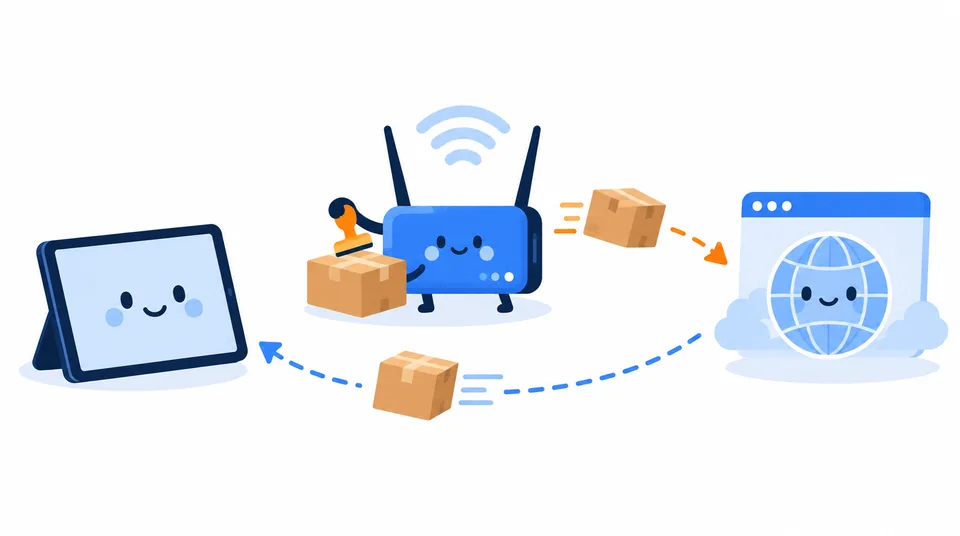
Here is an example. A tablet at 192.168.1.23 requests a webpage. The router sends the request from the public address on your connection and notes which tablet started it. When the website replies, the router matches the answer to that request and passes it back to the tablet. The website normally sees the public address, never the tablet’s local one.
Do not read that as a force field, though. NAT makes unsolicited inbound IPv4 connections harder, because there is no existing mapping for them. Firewall rules, port forwarding, VPNs, and other routing arrangements can still allow specific access. Security still depends on device updates, passwords, Wi-Fi settings, and firewall configuration.
Which address do you need?
| Your task | Address to use | Why |
|---|---|---|
| See what a website receives from your connection | Public IP | It is the internet-facing address visible to the site |
| Connect to a printer or device on your Wi-Fi | That device’s private IP | It is meaningful inside your local network |
| Set up a local address reservation | Private IP | The router uses it to identify the device locally |
| Host a service for people outside your home | Public endpoint plus routing and firewall setup | A private address alone is not reachable from the public internet |
To find the local address on a particular phone or computer, check its active Wi-Fi or Ethernet details, or the router’s connected-device list. Exact menus vary by operating-system and device version, so our local IP address guide covers the platform-specific steps. To check the address websites see, use Loqmi’s IP checker.
When the address does not match
Compare the router’s internet-facing (WAN) address with the address Loqmi shows. Do not compare the router’s local gateway address, often something like 192.168.1.1, with the website result. The two sit on opposite sides of the router, so they will not match.
| What you see | Likely explanation | Useful next check |
|---|---|---|
Device address is 192.168.x.x, 10.x.x.x, or 172.16–31.x.x | Normal private IPv4 addressing | Use it for local devices; use Loqmi to see the public address |
| Router WAN address differs from Loqmi’s result | Possible carrier-grade NAT (CGNAT), another router upstream, VPN, or IPv4/IPv6 comparison | Check the router’s WAN status and whether a VPN is active |
Router WAN address is in 100.64.0.0/10 | Likely ISP shared address space for CGNAT | Ask your ISP about a public IPv4 address if you need inbound access |
| Local printer or server stopped responding | Address changed, devices are on guest Wi-Fi, or a firewall blocks local traffic | Check both devices’ networks and the router’s client list |
The 100.64.0.0/10 block is shared address space reserved for ISP use. RFC 6598 defines this separate range, and it is not one of the three RFC 1918 ranges for ordinary private networks. With CGNAT, your provider translates traffic upstream, so port forwarding on your own router alone may not be enough. Our CGNAT explainer walks through the implications.
30-second check: Open Loqmi and note your public IP. Then open the WAN/Internet address in your router app or admin page. If the two differ, look for a VPN, a second router, or a WAN address in 100.64.0.0/10. Treat this as a clue, not a diagnosis, since IPv4 and IPv6 can also give different results.
Does a private network make you private online?
No. A private IP keeps that local address from being routed as-is across the public internet, but the outside world still sees the public address your connection uses. That address can point to your ISP or an approximate location. By itself, it does not reveal your exact home address.
A VPN changes the path your traffic takes. Websites may see the VPN server’s public address, while your device still has local addresses on its Wi-Fi and VPN interfaces. A VPN does not make everything anonymous, and it does not fix unsafe accounts or devices. Confirm the service is connected, then check that an IP checker shows the address you expect. Our VPN check guide explains what to compare.
Key takeaways
- A private network uses internal addressing and managed paths. “Private” does not automatically mean secure.
- RFC 1918 IPv4 ranges are
10.0.0.0/8,172.16.0.0/12, and192.168.0.0/16. - Your router usually uses DHCP and NAT to connect local devices to the internet.
- A router WAN address that differs from your public IP can point to CGNAT, a VPN, or another upstream router.
Frequently asked questions
Does IPv6 have private addresses?
Yes. IPv6 has Unique Local Addresses (ULAs), defined in RFC 4193, from fc00::/7. Locally generated ULAs use fd00::/8. They are for communication within a site or cooperating sites and are not intended to be routed across the public internet. IPv6 also has link-local addresses, which serve a narrower, on-link purpose.
Is a private network the same as a private Wi-Fi network?
Not necessarily. A Wi-Fi network can use private IP addresses while still allowing any nearby person with the password to join. A private or internal network describes its addressing and access boundaries; Wi-Fi security settings control who can join. Use a strong, unique Wi-Fi password and keep router security settings current.
Can two devices have the same private IP address?
Two devices on the same network should not use the same address at the same time; that causes an address conflict. Separate networks can reuse an address such as 192.168.1.20 without trouble while they remain separate. If you connect those networks through a VPN or routed link, overlapping ranges can make traffic go to the wrong place.
Is 100.64.0.0/10 a private network range?
It is reserved shared address space for service-provider networks, often used between an ISP's carrier-grade NAT equipment and a customer's router. It resembles private IPv4 space in that it is not globally routable, but it is not one of the RFC 1918 private-use ranges and is not intended as a general home-LAN range.
Sources
Related articles

Ghost IP Address: What It Means and How to Check
Ghost IP is informal networking shorthand, not one defined address type. Learn the three common meanings and how to check which one you are seeing.

Validate IP Address: IPv4 and IPv6 Rules
Check IPv4 and IPv6 syntax, understand common validation errors, and separate a well-formed address from one that is public or reachable.

IP Tunnel Explained: How Tunneling Works
An IP tunnel carries packets through another network by wrapping them in an outer packet. Learn how it works, when it helps, and what it does not secure.