IP Address Detector: What It Shows and What It Can't

An IP address detector shows the public internet address your connection presents to a website, often alongside an estimated location and network provider. It helps you check your connection or VPN, but it cannot pinpoint your home or identify you by itself, so treat the result as a clue. Then compare what Loqmi sees with what you expect.
Check the address a website sees
Open Loqmi's IP lookup to see the public address, ISP, ASN, approximate location, and reverse DNS visible from your current connection. That address may not belong to your laptop or phone directly. On home Wi-Fi, your router and provider's network may both be involved in getting traffic onto the internet.
Internet Protocol (IP) uses source and destination addresses so responses can find their way back. A website sees the source address at the internet-facing end, which can differ from your device's local address. Think of the router as a receptionist. Several people can call from one company number, and that number alone does not say which desk made the call.
The simplest IP detect check is to load the tool, note the address and provider, then repeat it on another network or with a VPN turned on. If the result changes, that is expected, because the path changed.
What an IP address detector can tell you
A detector may show the address, whether it uses IPv4 or IPv6 (the two versions of Internet Protocol), the Internet Service Provider (ISP) or other network operator, and an estimated country, region or city. Some tools also report an Autonomous System Number (ASN): a number identifying a network operator's routing system. These details describe the connection or address block. They say little, and nothing certain, about the person using it.

| Result | What it means | What it does not prove |
|---|---|---|
| Public IP | The source address the destination site observed for this request. | That one device or person always uses it. |
| ISP or ASN | The provider or organization routing the address block. | The account holder's name or street address. |
| City or map pin | A database estimate for where the network address may be used. | Your live GPS position or exact home. |
| IPv4 or IPv6 | The version of IP used for that particular request. | That the other version is absent or exposed. |
Geolocation comes from databases that map network ranges to approximate places. MaxMind, one provider of these databases, says accuracy varies by country, network type and ISP, and that its data cannot locate a specific household or street address. If a tool displays coordinates, read them as a database point with some uncertainty, not as a dot on your front door.
Public, private and shared addresses
Your device can have a private address for communicating inside a home or office network and a public address used on the wider internet. A router may use Dynamic Host Configuration Protocol (DHCP) to give devices their local addresses. RFC 1918 reserves IPv4 ranges for private networks; they are not meant to be routed across the public internet. Your router commonly uses Network Address Translation (NAT) to let several local devices share an outside IPv4 address.
There is another layer: an ISP may use Carrier-Grade NAT (CGNAT), where multiple customers share public IPv4 capacity. RFC 6598 reserves the shared range 100.64.0.0/10 for this purpose. So a public result may point to your home router, an ISP gateway shared among customers, or a VPN exit. It does not have to point to your individual device. Read more about public versus private IP addresses and CGNAT.
The Internet Assigned Numbers Authority (IANA) coordinates global IP registries, and Regional Internet Registries (RIRs) manage address resources for their regions. Their IPv4 registry and allocation records help you identify the organization responsible for a network block; they do not show which customer is using it right now.
For example, if your laptop has a local address such as 192.168.1.24 but Loqmi shows a different public IPv4 address, that is normal. The router translates the traffic as it leaves your network. The documentation-only address 203.0.113.42 is reserved for examples, so do not mistake it for a real address to test. The private address standard and shared ISP range standard explain why some addresses cannot be looked up as individual public endpoints.
Why the detected location can be wrong
An IP address identifies a routable network endpoint. It is not a GPS receiver. A provider may send traffic through a regional hub, a mobile carrier may route many phones through a gateway, or a Virtual Private Network (VPN) may make every site see its server's address. A proxy, an intermediary that forwards requests, can also change the address the destination sees. Databases can lag behind address reassignments. The dot on the map is an estimate, and it looks more certain than it is.
| What you notice | Likely reason | What to check |
|---|---|---|
| City is nearby but not yours | Database uses an ISP hub or broad estimate. | Compare another IP location source and check the provider name. |
| Country changes with VPN | The site sees the VPN exit network. | Check the VPN's selected location and run a VPN leak check. |
| Phone and Wi-Fi show different providers | Mobile data and Wi-Fi use separate internet connections. | Switch off Wi-Fi, check once, then reconnect and compare. |
| Router address differs from web result | Local routing or CGNAT sits between your device and the public internet. | Compare the router's WAN address with the result; ask your ISP if needed. |
What an IP does and does not reveal
Websites and online services can see the address your connection uses. That is how replies find their way back to you. A person with the address can often identify the ISP or hosting network and get an approximate geographic result. They generally cannot query a public lookup and get your name, exact home address, files, passwords or browsing history from the IP alone.
Your ISP may keep internal records that link an address and a time to a customer account. A public lookup does not have those records. Keep this in proportion: an IP address is personal network information, but a lookup map is not a live tracking feed. If someone threatens to locate you from a map pin, the pin itself is not proof they know where you live. For a fuller privacy answer, see what someone can find from your IP.
If you are troubleshooting abuse or an account alert, save the time, service and exact message, then contact that service or your ISP through its official support channel. Do not confront a person based only on an IP result; address blocks are often shared and can be reassigned. If you want to change the address visible to sites, first understand the trade-offs in how public IP changes work.
Run a simple IP self-test
- Open Loqmi on your normal connection and note the public IP, protocol, ISP and estimated location.
- If you use a VPN, connect it and reload the page. The public result should usually reflect the VPN network and its exit region.
- Disconnect the VPN and check again. Compare the addresses themselves, because two providers may place the same address in different spots.
- Switch between Wi-Fi and mobile data and repeat. Different results are normal because the routes and providers differ.
- If you also need connection performance, run Loqmi's speed test separately. Speed and public IP answer different questions, like checking both the road and the return address on a parcel.
Reading a mismatch: A changed public address can confirm that your traffic took a different route. It cannot, by itself, prove that every app uses that route or that a location database is accurate. For a privacy check, test the browser and apps you actually use.
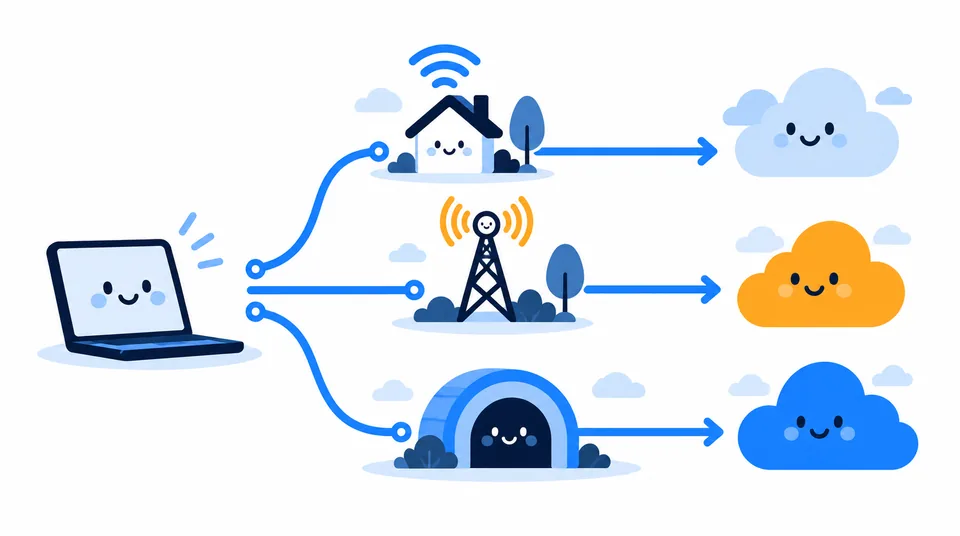
If your VPN check shows your usual ISP address, confirm the VPN is connected, reload after the connection settles, and check whether the service has separate IPv4 and IPv6 results. If the result remains unexpected, use the VPN provider's support instructions rather than changing router settings at random; networking rewards curiosity but is unimpressed by guesswork.
Key takeaways
- An IP detector shows the public address a site sees for that connection at that moment.
- Provider and location fields describe a network estimate, not a verified person or home.
- NAT and CGNAT can put multiple devices or customers behind a shared public IPv4 address.
- Compare results across Wi-Fi, mobile data and VPN states to understand which route a site sees.
Frequently asked questions
Can an IP address detector identify the person using an internet connection?
No. A public lookup can associate an address with a network operator and an approximate area, but it does not name the subscriber. An internet provider may be able to match an address and a precise timestamp to an account in its own records, subject to applicable law and its policies.
Why does an IP lookup show a location I have never visited?
The result may describe the provider's routing hub, a mobile carrier gateway, or an outdated database entry rather than your device's physical position. A VPN or proxy can also make the lookup show its server location. Compare another lookup and check which network you are using.
Does changing DNS hide my IP address?
No. DNS chooses or looks up the address for a domain name; it does not replace the public source address that websites receive from your connection. A VPN changes the network path and the address shown to destination sites, but DNS behavior depends on how it is configured.
Why do I see IPv4 on one check and IPv6 on another?
Your connection may support both protocols, and each test site may use a different one. Browsers and networks can choose IPv4 or IPv6 depending on availability and connection timing. Seeing both is normal and does not by itself mean a privacy leak.
Sources
Related articles

IP Address by Email: What Headers Can Reveal
Email headers can reveal the mail servers behind a message, but usually not the sender’s home IP. Learn which Received lines matter and how to read them safely.

How to Change Your IP Address on Any Device
Choose the right way to change a public or local IP, follow device-specific steps, and verify the result without guessing.

How to Hide My IP Address: Safe Methods Compared
Choose an IP masking method by who you want to hide from, set it up on your device, and check whether websites see the new route.