My WAN IP Address: Find It and Check What It Means

To find my WAN IP address, open Loqmi from the Wi-Fi or wired network you want to check. The IP checker shows the public address websites see. Your router’s WAN field shows the address assigned to its internet-facing side. They often match. But an ISP’s carrier-grade NAT, a second router, a VPN, or an IPv4/IPv6 mismatch can add another hop in between, like a hallway you forgot was there. Here’s how to compare them without blaming the wrong box.
Open Loqmi from the network you want to check. To find the router’s WAN value, open its app or admin page and look under Internet, WAN, Status, or Connection. Checking a forwarded service? Test its TCP port with Loqmi’s port checker. Labels vary by maker (router menus are less standardized than coffee orders).
My WAN IP address vs. the outside IP address
WAN means wide area network. It is the connection that carries traffic from your router toward your internet service provider (ISP). LAN means local area network, the home side where your phone, computer, television, and other devices connect. “External IP address” and “outside IP address” usually mean the public address a website sees. People sometimes say “WAN IP” as shorthand for that same value, too.
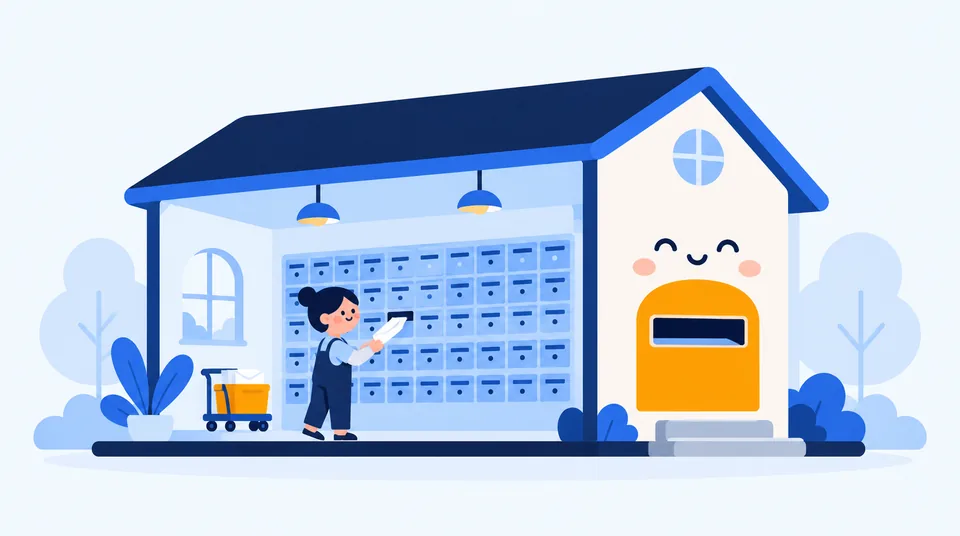
At home, a router usually gives each device a private local address. Then it uses Network Address Translation (NAT) to send their internet traffic out through one outside address. Think of the router as a receptionist with one public phone number and a very busy extension list. So your laptop’s Wi-Fi address is normally not the one a website sees.
Private IPv4 ranges include 10.0.0.0 to 10.255.255.255, 172.16.0.0 to 172.31.255.255, and 192.168.0.0 to 192.168.255.255, as defined by RFC 1918. These are meant for internal networks, so they are not globally routed on the public internet. A local device getting one through Dynamic Host Configuration Protocol (DHCP) is normal. DHCP is the automatic system that hands out network settings.
IPv6 addresses are longer and follow different ranges and routing rules. A site can see an IPv4 address, an IPv6 address, or both depending on the connection. Compare like with like: an IPv4 WAN value against the IPv4 Loqmi reports, and an IPv6 value against IPv6. The two versions are separate paths, not two spellings of one number.
How to find your WAN IP
- Connect to the exact home network you want to inspect. If your phone is on mobile data or guest Wi-Fi, it may be using a different router or ISP path.
- Open Loqmi’s IP checker and note the address shown. This is the public IP address visible to Loqmi for that browser connection. A VPN or proxy can make it show that service’s address instead.
- Open the router or gateway’s app/admin page. Look for Internet, WAN, Status, Broadband, or Connection, and record the WAN IPv4 address. Avoid the LAN or Gateway field. That is usually the router’s local address, not its outside one. If you need help reaching the page, follow our router login guide.
- Compare values from the same time and the same IP version. If you have a modem/router plus a separate Wi-Fi router, check which device is the main gateway and inspect both if needed.
On Windows 11, open Settings > Network & internet > Wi-Fi and select the connected network, or choose Ethernet. This shows the device’s IPv4, not the router WAN IP. Run ipconfig in Command Prompt to find Default Gateway, the router’s local page address. Use the router app or page for WAN status.
To make a clean comparison, pause a VPN or proxy temporarily, keep the same network connected, refresh Loqmi, and compare IPv4 with IPv4. Turn the VPN back on afterward if you use it for privacy.
What the comparison tells you
| What you see | Likely explanation | Next check |
|---|---|---|
| Router WAN and Loqmi match | The router likely holds the public IPv4 address for that connection. | This is consistent with a direct public address, but it does not prove a service is reachable from outside. |
| WAN starts with 100.64 through 100.127 and differs | The address falls within 100.64.0.0/10, shared address space reserved for provider networks and commonly used for carrier-grade NAT (CGNAT). | Ask your ISP whether it uses CGNAT and whether a public IPv4 option is available. |
WAN is 10.x, 172.16–31.x, or 192.168.x and differs | There is private addressing upstream. It may be ISP-side NAT, or a second router/modem you control (double NAT). | Check whether the modem also routes, then ask the ISP if the upstream device is theirs. |
| WAN differs but is not in those ranges | A VPN/proxy, multi-WAN setup, stale comparison, or IPv4/IPv6 mismatch may explain it. | Repeat on the same connection and IP version with VPN/proxy routing paused. |
RFC 6598 calls 100.64.0.0/10 Shared Address Space. A WAN address there is a strong CGNAT clue. A private WAN means another private hop exists. It may be your own second router, sitting in a drawer and collecting dust and NAT rules.
A matching public WAN address does not promise that port forwarding, a game server, or a camera will work; firewalls, service settings, or ISP policy can still block incoming traffic. See what CGNAT means and how port forwarding works.
Why your WAN IP changes
Many residential connections receive a dynamic address that the ISP can change when a lease renews or equipment reconnects. A reboot may or may not change it, as if the ISP were flipping a coin. A static address is meant to stay fixed. “Public” describes routability. “Static” describes whether the assignment stays the same.
A VPN or proxy can change the address sites observe without changing your router’s WAN value. Traffic exits through that intermediary, so Loqmi reports the address for the browser’s route; the router page shows what the ISP assigned to that router.
For IPv6, your device may have a globally reachable address even while IPv4 is behind CGNAT. “Globally reachable” does not mean unprotected: router and device firewalls still matter. Treat IPv4 and IPv6 separately, and do not open firewall rules just to make a test pass. IP geolocation may point to an ISP facility or nearby region rather than your front door.
If the addresses do not match
First check the same connection and IP version, and make sure Loqmi was not routed through a VPN, proxy, or mobile network. Refresh both values close together because dynamic addresses can change.

Then check the boxes between home and ISP. A modem/router plus your own router can create double NAT, like a mirror facing another mirror, with a private WAN address on your router. Ask your ISP whether its device is routing or in bridge mode before changing it; do not factory-reset equipment or disable firewalls to diagnose a mismatch.
If the WAN is in 100.64.0.0/10, or the ISP confirms its own NAT, explain what you need (for example, inbound remote access) and ask about a public IPv4 address. Availability and cost vary. If the observed address is unexpected while a VPN is enabled, compare it with the address shown when that route is paused.
A quick WAN IP self-test
Check Loqmi, then compare its result with the router’s Internet/Status WAN IPv4. A match snapshots the address websites see; a mismatch calls for the table’s NAT, VPN, and IP-version checks.
This does not identify a person, pinpoint a home, measure speed, or prove a port is open. For bandwidth and latency, use the Loqmi speed test; IP addresses are not speedometers, despite their enthusiasm for looking technical.
Key takeaways
- Loqmi shows the public address visible to the browser; your router’s WAN page shows the address assigned on its internet-facing side.
- Compare the same network, moment, and IP version, with VPN/proxy routing accounted for.
- A 100.64.0.0/10 WAN address points toward CGNAT; an RFC 1918 WAN address can mean ISP NAT or a second router.
- A matching public address does not guarantee that inbound services or port forwarding will work.
Frequently asked questions
Does WAN mean wireless?
No. WAN means wide area network, the network connection on the router’s outside-facing side. Wi-Fi is a wireless way for your phone or laptop to connect to the local network. A wired Ethernet connection from a modem to a router can be the WAN connection too. The similar-sounding terms describe different things.
Can two households have the same public IP address?
Yes. An ISP can place multiple customers behind carrier-grade NAT, so they share one public IPv4 address while the ISP tracks the separate connections. That public address identifies the shared exit point at that moment, not necessarily one household or one person. IPv6 assignments can work differently.
Does my public IP reveal my exact home address?
Usually, no. An IP lookup can often estimate a country or region and identify an internet provider, but the map point may represent provider equipment rather than your home. Location precision varies by provider and database. Read more about what an IP can reveal in our guide to IP-based location.
Will changing my DNS server change my WAN IP?
Usually not. DNS translates names such as a website address into IP addresses; it does not normally change the internet address assigned to your router or the route your traffic takes. A VPN, proxy, router setting, or ISP address change can affect the address websites see.
Sources
Related articles
IP Address Conflict: Causes and Fixes
An IP conflict is usually a local address assigned twice. Learn how to reconnect safely, check DHCP settings, and stop the same device collision returning.

My IP Address and Port: What You Can Actually See
Your public IP identifies the network seen by websites; a port identifies a service for a particular connection. Learn what you can check and why.

NAT Firewall Explained: What It Does and Doesn't Do
A NAT firewall helps keep unsolicited inbound connections from reaching your home devices, but it is not a full security filter. Learn how it works and how to troubleshoot CGNAT and port forwarding.