NAT Firewall Explained: What It Does and Doesn't Do

A NAT firewall is the inbound barrier people usually mean when their home router translates private device addresses to one public address and lets replies back through. It can make unsolicited connections harder to reach your devices. NAT is not a full firewall, though, and it does not inspect every packet for danger. A quick check of your router’s WAN address can explain why a port-forward rule is not working.
What is a NAT firewall?
Network Address Translation (NAT) changes Internet Protocol (IP) address information as traffic crosses a router or gateway. Your phone uses a private address at home, while websites see the router’s public IPv4 address (an address using version 4 of IP). The private ranges reserved by RFC 1918 are 10.0.0.0/8, 172.16.0.0/12, and 192.168.0.0/16.
Most home routers also translate port numbers, a form commonly called Port Address Translation (PAT) or NAT overload. The router records which inside device started each conversation, then uses that mapping to send the reply to the right device. Think of the router as a receptionist tracking extensions; without the list, “the internet called” is not enough information to find your laptop.
“NAT firewall” describes the practical effect of this behavior, not a separate security standard. RFC 2663 treats NAT as translation functionality.
How inbound traffic is handled
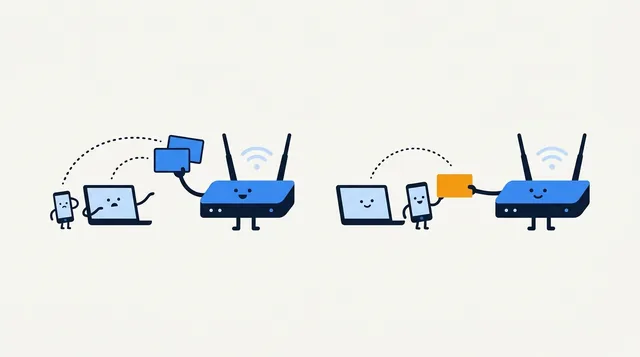
When a device starts an outbound connection, the router records a temporary mapping between the device’s private address and port and the public-side address and port. A returning packet that matches the expected connection goes back to the original device. An unsolicited inbound packet has no such mapping, so the router generally has no destination device for it and drops it.
That default varies with filtering policy, connection tracking, UPnP, exposed-host or DMZ settings, port mappings, and firmware. “Generally” is doing honest work here.
NAT does not stop an infected device from making an outbound connection, prevent you from entering a password on a phishing page, or inspect a file you download. It also does not hide your public IP from the websites and services you contact. For the difference between the address your router uses and the one sites see, read public vs. private IP addresses.
NAT vs. a firewall
NAT answers, “Which address and port should this packet use on the other side?” A firewall answers, “Should this traffic be allowed by policy?” Consumer routers often squeeze both jobs into one box, like a kitchen gadget that is both a toaster and a kettle, which is why their labels and marketing blur the line. The jobs are still different.

| Feature | What it does | What it does not mean |
|---|---|---|
| NAT/PAT | Rewrites addresses and often ports; tracks mappings so replies reach the initiating device. | It does not scan downloads or judge whether a connection is malicious. |
| Stateful firewall | Tracks connection state and applies allow or block rules to traffic. | It is not automatically configured well just because NAT is enabled. |
| Port forwarding | Creates a rule that sends selected inbound traffic to a chosen device and service. | It does not make the service secure; it deliberately makes it reachable. |
For home use, leave the router’s firewall enabled and install firmware updates. Open only the port and device a service needs, keep that device updated, and remove the rule later. A broad “DMZ host” setting is not a safer shortcut.
Router NAT firewall and port forwarding
Port forwarding sends selected inbound traffic to a local device. The service must be running and listening, its operating-system firewall must allow traffic, and its local address should stay stable (often through a DHCP reservation).
Router menus vary: look for “Port Forwarding,” “Virtual Server,” or “NAT.” Use the required port and protocol, Transmission Control Protocol (TCP) or User Datagram Protocol (UDP), and follow the service’s instructions. Random port-opening advice from a forum is not a networking plan.
Universal Plug and Play (UPnP) can let apps request mappings automatically, so check it if you find an inbound rule you did not add manually.
To check whether a forward is reachable from outside, first confirm the service is running, then use Loqmi’s port checker against your own public IP. A closed result can mean the service is off, the device firewall blocks it, the rule points to the wrong address, or an upstream NAT prevents access.
Also test from a genuinely external connection, such as a phone with Wi-Fi turned off. Some routers lack NAT loopback (also called hairpin NAT), so a working public-facing service may fail when you try to reach it from inside your own Wi-Fi using the public address.
Console labels such as Open, Moderate, or Strict NAT describe how a game platform can connect to peers; they are not universal settings or a direct security score for your router. The exact meaning varies by platform and game. If one title has trouble joining players, check its network guidance before changing a router-wide setting.
NAT firewall vs. CGNAT
Your home router translates traffic between your local-area network (LAN) and its wide-area network (WAN) connection. With Carrier-Grade NAT (CGNAT), your internet service provider (ISP) adds another translation layer and shares a public IPv4 address among customers. The reserved ISP shared range is 100.64.0.0/10, defined by RFC 6598.
Compare the router’s WAN/Internet IPv4 address with Loqmi’s public IP tool. If the router address is in an RFC 1918 range or 100.64.0.0/10, but Loqmi shows a different public IPv4 address, another NAT layer sits upstream. It may be your own modem/router (double NAT) or ISP-side CGNAT. If the device is unclear, ask your ISP.
CGNAT is not the same as your router’s NAT firewall. The former is provider-side address sharing, while your router still manages your household’s local devices. Think of CGNAT as the ISP’s switchboard and your router as the receptionist for your household. Either extra layer can complicate inbound hosting and port forwarding. Compare the terms in our guide to what CGNAT is, or see how port forwarding works before changing router settings.
Troubleshoot common symptoms
| Symptom | Likely cause | Next check |
|---|---|---|
| Port forward saves but outside access fails | Service is not listening, device firewall blocks it, wrong protocol/address, or upstream NAT. | Verify the service and local rule first; compare WAN IP with your public IP. |
| Game or peer-to-peer app reports restricted NAT | Inbound mappings are limited, or there are multiple NAT layers. | Check the app’s required network settings and router WAN address; do not expose unrelated ports. |
| All devices show one public IPv4 address | Normal home NAT/PAT is likely in use. | That alone does not prove CGNAT; compare the router WAN address. |
| Web pages load, but a home server is unreachable | Outbound access works, while inbound forwarding may be blocked upstream. | Ask the ISP whether the line uses CGNAT or request a public-address option. |
If the WAN address is public and matches Loqmi, check the host and router rule. If it differs, identify whether another router is yours or the ISP’s; each customer-controlled router may need a rule. ISP-side CGNAT cannot usually be fixed in your router, so ask about a public IPv4 option or use a service designed for outbound-initiated connections.
Loqmi’s speed test checks general connection performance; it cannot show whether a port is open. Fast broadband does not override NAT rules. Networks keep those problems in separate boxes.
What your public IP can tell you
A website sees your internet-facing public IP, not your router’s private device addresses. Use IP lookup or read about public and private IP addresses.
IPv6 works differently: devices can have globally routable addresses without IPv4-style NAT, while a router firewall can still filter unsolicited inbound traffic. Check that firewall separately; NAT is not the protection mechanism there. A WebRTC leak test checks whether a browser reveals IP information to a website, which is a separate question from whether a router accepts inbound connections.
Key takeaways
- NAT translates addresses; firewall rules decide what traffic is allowed.
- Typical home routers track outbound mappings and pass matching replies, while unsolicited inbound traffic usually has no destination.
- Port forwarding creates deliberate inbound reachability and should be limited to a required service and device.
- Compare your router’s WAN IPv4 address with your public IP to spot double NAT or possible CGNAT.
- NAT does not block phishing, malware downloaded by a user, or unsafe outbound connections.
Frequently asked questions
Does NAT protect my devices from malware or phishing?
No. NAT may make unsolicited inbound connections harder to route to a device, but it does not inspect a downloaded file or decide whether a website is trustworthy. Keep device and router software updated, use endpoint security where appropriate, and be cautious with links and attachments. Those protections address risks NAT was never designed to handle.
Can I turn off NAT on my home router?
Most home routers rely on NAT for IPv4 internet access when several devices share one public address. Disabling it may break connectivity unless your ISP and network design provide a separate public address for each device or another gateway handles translation. The setting name and consequences vary by router, so check the model's documentation before changing it.
Does NAT work the same way for IPv6?
Usually not. IPv6 devices commonly receive globally routable addresses, so address translation is often unnecessary. A router firewall can still block unsolicited inbound IPv6 traffic; that filtering policy is separate from NAT. Do not assume an IPv4 NAT setup automatically describes how your router handles IPv6.
Why does a port checker say closed when I added a port-forward rule?
The service must be running and listening on that port during the check, and the device firewall must allow it. The rule must use the correct protocol and current local address. A private WAN address, CGNAT, or another router upstream can also prevent outside traffic from reaching your router. Test from a different internet connection and verify each layer.
Sources
- NIST Glossary: Network Address Translation
- RFC 2663: IP Network Address Translator Terminology and Considerations
- RFC 1918: Address Allocation for Private Internets
- RFC 6598: Shared Address Space Request
- Cisco: What Is Network Address Translation?
- ASUS Support: Set Up Virtual Server / Port Forwarding
Related articles
IP Address Conflict: Causes and Fixes
An IP conflict is usually a local address assigned twice. Learn how to reconnect safely, check DHCP settings, and stop the same device collision returning.

My IP Address and Port: What You Can Actually See
Your public IP identifies the network seen by websites; a port identifies a service for a particular connection. Learn what you can check and why.

Free Dynamic DNS Service: How to Choose and Set Up
A DDNS name follows your changing public IP, but it cannot bypass CGNAT or open ports. Learn how to choose a provider, configure updates, and troubleshoot access.