Proxy vs VPN: Which One Should You Use?

A VPN usually fits when you want one encrypted route for many apps. A proxy fits when you want to send one chosen browser or app through a middleman. The big difference is coverage. A VPN normally builds a protected tunnel to its server, while a proxy usually forwards only the traffic you point at it. Either way, the operator becomes part of your trust equation.
Proxy vs VPN: the practical difference
Both can make a website see the relay server’s IP. A proxy forwards selected requests. A VPN builds a route and typically encrypts the connection to its endpoint.
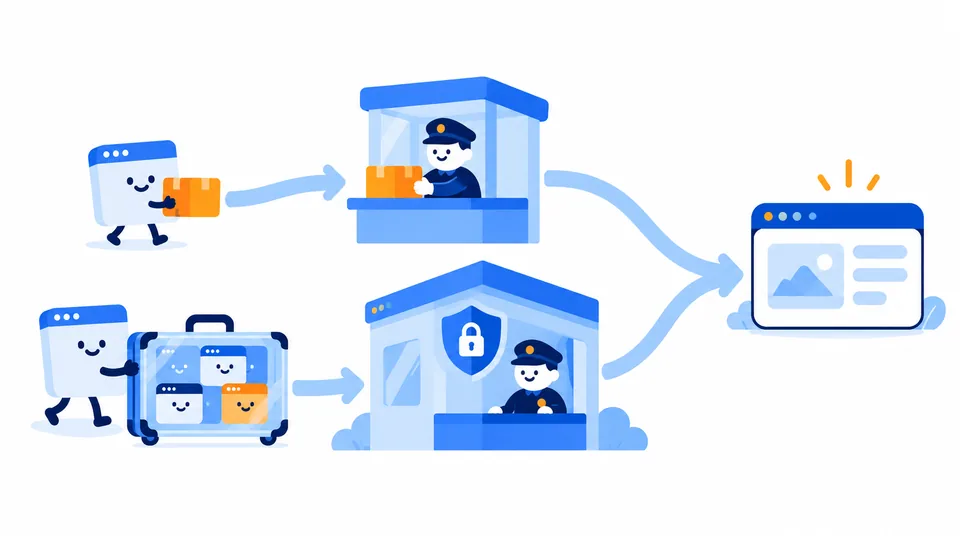
The common surprise: your browser can show a new IP while another app still connects directly, because proxies are often app-specific. It is a bit like one guest leaving by the side door while everyone else uses the front. To check browser exposure after changing routes, run Loqmi’s WebRTC leak test and review the IPs it finds.
| Question | Proxy | VPN |
|---|---|---|
| What traffic uses it? | Usually a configured browser, app or protocol. A network administrator may impose a proxy more broadly. | Usually traffic from the device, subject to split tunneling, excluded apps and routing settings. |
| What does the destination see? | The proxy IP for requests routed through it; a transparent proxy may not hide your IP. | The VPN exit IP for traffic that actually follows the tunnel. |
| What is encrypted? | Not necessarily the proxy connection. HTTPS can protect browser-to-site content; some proxy setups separately encrypt the client-to-proxy hop. | Typically the device-to-VPN-server tunnel. HTTPS can still protect the separate connection from the VPN server to a website. |
| Who do you trust? | The proxy operator can receive your connection and may log metadata or inspect unencrypted traffic. | The VPN operator terminates the tunnel and can associate your connection with its traffic and metadata. |
| Good fit | One app needs a different route, or you are checking a site from another exit. | You want broader traffic coverage on a network you do not control, or need access to an approved private network. |
Think of a proxy as a forwarding address for selected mail. A VPN is a sealed courier bag sent to another office. The bag protects the trip to that office. What happens after delivery depends on the destination connection and the people handling it.
Running both without a routing reason is like forwarding the same mail twice. It works, but now you have two stops to troubleshoot.
What a proxy does (and what the label leaves out)
A forward proxy fetches resources for a client. A reverse proxy instead sits in front of a website’s servers.
If your proxy settings live in a browser, they may apply only there. Workplace settings can cover different traffic. Windows lists proxy and VPN separately, so changing one does not prove every app uses that route.
- HTTP proxy: handles web requests and may inspect unencrypted messages.
- HTTPS proxy: may mean TLS to the proxy, or a proxy that tunnels HTTPS. Ask which link is encrypted.
- SOCKS5: a general relay protocol defined by RFC 1928. It can carry traffic from a configured app, but SOCKS5 does not encrypt that traffic by itself.
- Transparent proxy: a network may route traffic through it without you choosing the setting. It can filter or monitor traffic and may still identify the original client.
- Private proxy servers: these limit access to a person, team or customer rather than being open to everyone. “Private” describes access, not guaranteed encryption, clean logging or trustworthy ownership.
A proxy changes the route, and encryption is a separate question. HTTPS generally protects page contents from a forwarding proxy, though the operator may still see connection details. If the proxy ends the encryption itself, it may see more.
Do not treat an unfamiliar proxy as a privacy service. The operator handles your connection. Use an unknown relay only for low-risk tasks. Never assume a changed IP protects your account credentials or payment details.
What a VPN protects, and what it moves
A virtual private network (VPN) creates a connection to a VPN endpoint and routes selected traffic through it. The tunnel is usually encrypted. So a local Wi-Fi operator or internet service provider (ISP) can see the VPN connection, its timing and its volume, but should not see the tunneled content. NIST’s IPsec (Internet Protocol Security) VPN guidance describes one standards-based approach. Consumer VPNs also use other protocols.
At the VPN server, traffic exits toward its destination. HTTPS may separately protect the session to the website. Your ISP sees the tunnel, while the VPN provider handles the traffic leaving it. The provider still has that visibility, so a VPN does not promise anonymity.
“All traffic” needs a footnote. Split tunneling can exclude apps, DNS or IPv6 handling can vary, and a dropped tunnel may fail open. Check routing and kill-switch options. Neither tool hides accounts or cookies (your IP address is not an invisibility cloak).
Choose by the task, not by the promise
- Use a VPN when you want several apps to share an encrypted route on public Wi-Fi, or when an employer gives you a VPN profile to reach internal systems.
- Use a proxy when a specific app must use a different exit IP, or when you are testing how a site appears from another network. Make sure the app itself supports the proxy, and know what data the operator can see.
- Use neither as a cure-all for account tracking, unsafe downloads, phishing or a device that is already compromised. Those need different controls.
A proxy can be the right small wrench for one app; it is not a whole-device toolbox.
Speed is not a reliable tie-breaker, and judging a route by feel is about as useful as picking a checkout line by the cashier’s mood. Compare before and after with Loqmi’s speed test under similar conditions.
For more options, read ways to hide your IP address. If you specifically want a VPN, use our guide to checking whether a VPN is working.
Check what your browser reveals
- Open Loqmi’s IP checker before you change anything. Note the public IP, ISP and approximate location it reports.
- Turn on the proxy or VPN, then reload the checker. A changed IP suggests the browser’s web request is leaving through a different address.
- Repeat the check in the app you care about. A browser result cannot confirm the route used by a game, mail client or background app.
- Turn the service off and check again. This gives you a baseline and shows whether a setting stayed on.
- For performance, run the speed test before and after using the same connection conditions.
A location pin is an estimate based on IP registration and geolocation databases, not GPS. Those databases can be stale, like an old address book that never heard you moved. If the IP changed but the map did not, see why IP location can be wrong before assuming the tunnel failed.
Change one setting at a time. If you switch on a proxy and a VPN together, you may see an exit IP without knowing which service supplied it. One change, one reload, one useful result.
Troubleshoot a proxy or VPN result
| What you notice | Likely explanation | Next check |
|---|---|---|
| The IP is unchanged | The browser or app may bypass the proxy, or the VPN tunnel may not be active. | Check the service status and that app’s proxy or VPN route; reload the IP checker. |
| One app changes IP, another does not | A proxy usually applies only where configured; the VPN may exclude selected apps. | Inspect per-app settings and split tunneling. Test each app separately. |
| The IP changes but the ISP or city looks odd | The exit network may be registered to a host or a geolocation database may be stale. | Compare the numeric IP first. Check the IP location caveat before calling it a leak. |
| Speed drops or pages stall | The relay may be distant or congested, or page rewriting and tunnel overhead may affect performance. | Try a nearer exit, compare with and without the route using the same speed test, and check whether only one service is affected. |
| Your normal IP returns after a disconnect | The app may have no kill switch or may allow direct traffic when the tunnel drops. | Stop the sensitive session, review the kill switch setting, reconnect and verify before continuing. |
An IP checker is a bit like a doorman who only sees the front entrance. It reports its observed address, not every app’s route. Check per-app settings too.
Key takeaways
- A proxy forwards selected traffic; a VPN usually encrypts a broader device route to its endpoint.
- Proxy type matters. SOCKS5 and ordinary proxy settings do not automatically provide encryption.
- A VPN shifts trust toward its operator and does not hide accounts, cookies or browser fingerprints.
- Verify the browser-visible IP, then test the apps that matter and measure speed under comparable conditions.
Frequently asked questions
Does SOCKS5 mean the connection is encrypted?
No. SOCKS5 defines how a client relays traffic through a proxy and supports authentication, but it does not provide encryption by itself. The app or protocol carried through it may add encryption, such as HTTPS, but that is separate. Treat SOCKS5 as a routing method, not a security guarantee.
Can a proxy protect my whole phone or laptop?
Usually not when you configure an ordinary browser or app proxy. Other apps may continue using the direct connection. A network administrator can deploy a transparent proxy that affects many devices, but that is a managed network control, not the same as a personal proxy setting. Check each app's route if coverage matters.
Why can my ISP still appear after I connect to a VPN?
An IP lookup may label the VPN exit with the provider or hosting network that owns it, and some databases are slow to update. That does not by itself prove a leak. Compare the actual public IP, check the VPN status and routing options, and remember that your ISP can still see that your device connects to a VPN server.
Is using a proxy or VPN legal?
The technology itself is generally lawful in many places, but local rules, workplace policies, school networks and the terms of a website or streaming service can restrict particular uses. A proxy or VPN does not make unlawful activity lawful. Check the rules that apply to your location and the service you are accessing.
Should I run a proxy and VPN at the same time?
Usually no for ordinary browsing. Stacking them adds another point of failure and can make troubleshooting harder without improving the protection you need. Use both only for a specific, understood routing design, such as sending one application through a separate proxy while the rest follows a VPN, and test each route independently.
Sources
Related articles
What Is a WebRTC Leak? A Clear Guide
WebRTC can reveal network addresses while a VPN or proxy is active. Learn what each test result means and how to check your own setup without disabling useful calling features unnecessarily.

Whitelist IP Address Safely: A Setup Guide
An IP allowlist can narrow who reaches a service, but only when you enter the right public address and keep the rule current. Learn how to set one up safely.

How to Check If VPN Is Working: A Clear Test
Compare your public IP before and after connecting, then check DNS, IPv6, WebRTC, and the kill switch. Practical steps cover Windows, Mac, Linux, Android, and iPhone.