Private Proxy Servers vs. Shared Proxies

Private proxy servers reserve an exit IP for one customer. A shared proxy sends several customers through the same IP. Choose private when you need a stable address and control over its current use. Choose shared when low price matters more than reputation or capacity. Neither label guarantees privacy, encryption, speed, or a clean IP history.
“Private” usually means you alone use the address. It does not mean the proxy operator cannot see your traffic. Think of the label as a parking sign: it says who may park, not who can see the car. After setup, check your public IP to confirm the browser uses the proxy, then weigh the trade-offs against your task.
Private proxy servers vs. shared proxies
A forward proxy takes requests from your device or app and passes them on to a website. The website usually sees the proxy's public IP. The Internet Engineering Task Force (IETF) defines an HTTP proxy as a client-selected intermediary. A reverse proxy works the other way: it sits in front of a website's servers.
A private proxy assigns an exit IP to you alone for an agreed period. A shared proxy lets several customers use that IP. Vendors use “dedicated,” “private,” and “semi-dedicated” the way you would use “artisan” on a coffee menu, and none has a consistent industry definition. Check the concurrent user limit.
Proxy type and sharing model are separate. Datacenter, residential, mobile, and ISP describe the address source or presentation. Private and shared describe who uses it. For example, a datacenter IP can be private while a residential pool is shared.
Compare the trade-offs
| What matters | Private proxy | Shared proxy |
|---|---|---|
| Who uses the exit IP | One customer during the assignment | Multiple customers, depending on the plan |
| IP reputation | Your current traffic has clearer responsibility; prior history can remain | Other customers can affect blocks, challenges, and rate limits |
| Capacity | Less contention from other customers, but no guaranteed speed | Capacity and target-site limits may be shared |
| Cost | Usually higher per IP | Usually lower per IP |
| Best fit | Stable sessions, allowlists, controlled testing | Low-stakes browsing or jobs that tolerate retries |
A dedicated IP can support an allowlist: another service accepts connections from a known address. Confirm how long the address stays assigned to you. Shared IPs make weak allowlist candidates, because other customers can use the same address.
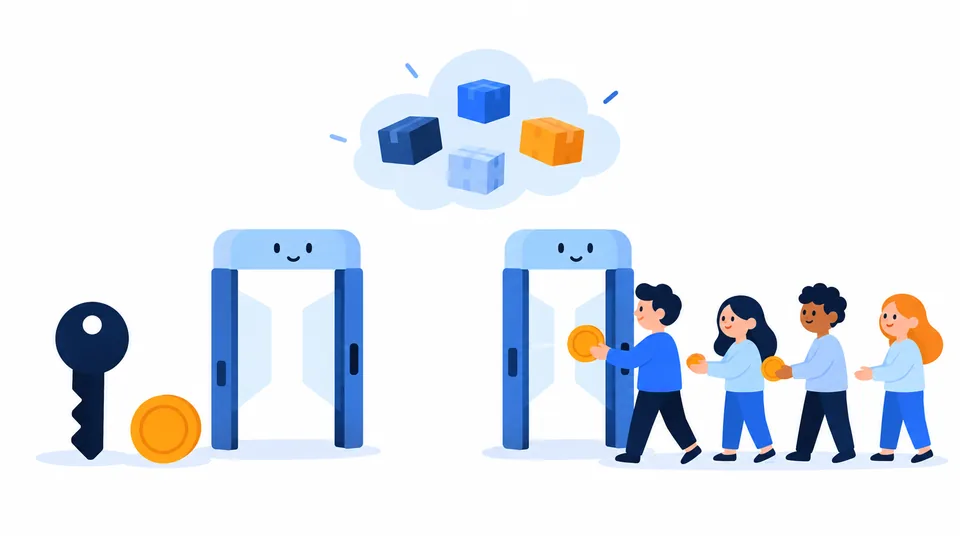
Private does not automatically mean fast. Your route, proxy hardware, distance, destination limits, and connection all matter. Exclusivity removes some contention, not every bottleneck. A dedicated lane still cannot control the weather.
Choose by the task
Start with the cost of an unreliable or previously used IP. If you need one stable source address, consider private. If retries are fine and the sharing terms are clear, shared can cut costs.
- Allowing access to your own server: consider a private address and confirm that it remains assigned for the full period you need.
- Testing your own site: either can work if reputation and rate limits do not matter.
- Using a long-lived account: consistency can matter more than rotation, but a proxy does not make signed-in activity anonymous to that service.
- Collecting public pages at volume: one private IP can still hit per-IP limits. Follow the site's terms and use a permitted method.
- Handling payment or other sensitive data: do not treat proxy exclusivity as a security control. Prefer a trusted, encrypted connection and avoid sending credentials through an operator you do not trust.
For routing every device, compare a proxy with a VPN, since their coverage differs. See Loqmi's proxy vs. VPN guide.
Know the privacy and security limits
A proxy changes the network path. It does not erase your identity. Cookies, logins, browser fingerprinting, and what you submit can still identify you. Your internet service provider (ISP) can see that you connect to the proxy. The operator can see metadata such as your source address and destination. Encryption decides who can read the content.
For HTTPS, a browser can ask an HTTP proxy to open a tunnel with CONNECT, then set up Transport Layer Security (TLS) with the website. In this usual end-to-end setup, TLS protects the content, but the proxy handles the connection and may see destination details. TLS interception changes that trust model. SOCKS5 relays traffic. RFC 1928 says its security depends on the negotiated authentication and the surrounding connection.
Do not send proxy usernames or passwords over an untrusted plain-text connection. Ask whether the provider supports encrypted access, how it stores credentials and logs, and what happens when you cancel. “Private” describes sharing; it does not answer those questions.
A proxy may not cover every app or browser request. A browser can bypass it, and WebRTC may reveal an address depending on configuration. See our guide to hiding your IP address for broader limits.
Check what your proxy actually changes
After setup, verify the exit address and watch for common mismatches. These checks cannot prove that the address is assigned only to you.
- Before you enable the proxy, open Loqmi's public IP checker and note the address and ISP.
- Turn on the proxy in your app and reload the checker. If the address has not changed, the app may bypass the proxy or not be connected.
- Run the exit address through IP lookup. Country and ISP are estimates, not proof of physical location.
- Run the WebRTC leak test in the same browser if you are checking for browser address exposure.
- If access fails, check the exit IP with the five-list blacklist checker. A listing is a clue, since services use different reputation signals.
- Compare the speed test before and after with the same device and network. A slower result may reflect distance or server load, not sharing alone.
An outside check cannot prove that an IP is exclusive. Get the concurrency limit, assignment duration, replacement policy, authentication, and logging terms in writing. Treat vague labels with caution.
Write down the exit IP and which services worked on day one, like a photo taken before a party. Later, that baseline helps you tell proxy problems from home connection changes. Loqmi's VPN check guide uses the same before-and-after approach.
Questions to ask before paying
Ask whether “private” means one customer per IP, or just password-protected access. Confirm whether the IP is static, how long you keep it, and whether it can be replaced. An authenticated shared proxy is still shared. A password locks the door but does not make the room private.
Ask which protocols they support, how they protect credentials, which destinations and ports are allowed, and how bandwidth, concurrency, and support work. RFC 9110 notes that CONNECT creates tunnels and that proxies may restrict destinations or ports. Clear limits are more useful than “total anonymity.”
Define success before you buy. For an allowlist, test address stability. For fewer interruptions, test against the service you use and record every failure. To protect data from the proxy operator, evaluate the operator, its encryption, and its handling practices. Exclusivity alone does not resolve that trust issue.
Key takeaways
- Private means exclusive assignment under the provider's terms. Shared means other customers may use the same exit IP.
- Exclusivity can improve control and reduce reputation problems from other customers, but it cannot guarantee speed, a clean history, or anonymity.
- Pick by task: stable identity favors private, while cost-sensitive work that tolerates shared reputation may suit shared.
- Check the visible exit address, test for WebRTC exposure, and read the provider's logging and authentication terms.
Frequently asked questions
Is a private proxy safer than a shared proxy?
Exclusive use can reduce exposure to another customer's traffic and makes access easier to restrict. It does not make the connection encrypted by itself, stop the provider from seeing connection details, or guarantee that the proxy operator is trustworthy. Check the protocol, authentication, logging policy, and whether HTTPS remains end-to-end before sending sensitive information.
Can a private proxy hide my IP from every website?
It can make the proxy's public IP appear as the source for traffic that actually uses it. It does not automatically route every app through the proxy, and browser features such as WebRTC or a misconfigured bypass can expose a different address. Check both the public IP shown by the site and possible browser leaks, then confirm the apps you care about use the proxy.
Does a private proxy give me a new or clean IP address?
Not necessarily. Exclusive use describes the current assignment, not the address's history. The IP may have been used by someone else before you received it, and its reputation can already be poor. Check the address against relevant blocklists and test it with the specific service you plan to use before relying on it.
Should I use a proxy or a VPN for all my device traffic?
A proxy is often configured for a particular app or protocol, while a VPN usually creates a device or network tunnel for a broader set of traffic. The exact coverage depends on the software and settings. If you need whole-device coverage, check the VPN's routing and leak protections; if you only need one application to use another exit IP, a proxy may be simpler.
Sources
Related articles
What Is a WebRTC Leak? A Clear Guide
WebRTC can reveal network addresses while a VPN or proxy is active. Learn what each test result means and how to check your own setup without disabling useful calling features unnecessarily.

Whitelist IP Address Safely: A Setup Guide
An IP allowlist can narrow who reaches a service, but only when you enter the right public address and keep the rule current. Learn how to set one up safely.
Proxy vs VPN: Which One Should You Use?
A proxy routes selected app traffic; a VPN usually protects more of your device connection. Compare what each hides, who can see your traffic, and how to check your route.